Honest Review: Burst Sonic Toothbrush

Source: BurstOralCare.com

Teeth are important to me. I like my teeth to be white. And straight (thanks mom and dad for braces!). And, um… all there. As a lover of clean teeth, I’m also good about brushing them in the AM and PM. However, I suck at floss. Obviously, because I’m a human being.

Anyways, as part of my normal teeth maintenance, I visit my dentist every 6 months. At my last appointment when we were finishing up, they provided me with a referral link to a Burst Sonic Toothbrush.

Which, honestly, I felt was a little tacky.

I mean, are we at the point that dentists are now becoming influencers with promo codes?!

With that being said, I did click the link and check it out. I previously just used a normal ol’ toothbrush, but I was curious about an electric toothbrush. I clicked around on Amazon and the Target website and found that the Burst version was pretty much the same cost as all the rest, so I figured I might as well give it a try.

I bought this one: Sonic Toothbrush in black for me and in white for Travis. They are currently marked at $69.99, but I think the referral code was for $20 off each… so if you’re going to buy, do a little google search for a code!

According to their website:

  • 33,000 sonic vibrations/minute for an incredible but gentle clean
  • Removes more than 10x more plaque than a normal toothbrush
  • Soft bristles that won’t damage your gums
  • One month of battery life on a single charge
  • Refill plan, where they send you a brush head replacement every 12 weeks for $7

I’ve been using my new toothbrush for 3 months now and OHMYGOD I love it so much. It is set to vibrate for 2 minutes (the ideal time for brushing your teeth) and pauses every 30 seconds to give you time to move it to a different quarter of your month. Due to this, I am absolutely brushing my teeth better than I have in my entire life. Also, spending a full 30 seconds on each quarter of my mouth, means no missed spots in the back.

The best part is that every single day when I’m done brushing my teeth, they are SO CLEAN. They literally feel the same way it feels when you’re leaving the dentist after a cleaning. I am so super impressed that I’ve been telling everyone I know. And I had to write a blog post to tell you all too. And no, this isn’t sponsored in any way.

Since I’ve had my new toothbrush for 3 months, I just received my first brush head replacement refill. Normally I’m not a fan of automatic refill plans because what if I don’t use up the thing when the refill comes? But I really like this one because it’s a reminder to change my toothbrush head, which I really should be doing more often.

Both Travis and I love our new toothbrushes. I initially bought Jack a cheaper battery-operated toothbrush, but once that one inevitably breaks, I’ll be buying him a Burst Sonic toothbrush too.

There are promo codes to be found online, but I don’t have one because I’m not an ambassador for Burst or anything. I just really like their toothbrushes.
Home Chef: Making it Work for a Family of 3

We’ve been using Home Chef for years. In fact, I first blogged about the food delivery service back in 2018 (Reviewing Home Chef)and again in 2019 (Home Chef: 1 Year Check-In). Since the pandemic started, one thing that has been keeping me going is my weekly Home Chef order.

During the first year when I was working from home while Jack was online schooling, I simply didn’t have enough brainpower left to meal plan. Now that Jack’s back in school, it’s a little less crazy but I stuck with a weekly order because it makes my life SO MUCH EASIER.

The one thing that has changed over the past 3+ years of using Home Chef is Jack’s appetite. Back when we started using the service, cooking meals for two worked great because he did his own thing and ate ‘kid food’ like plain grilled chicken or macaroni and cheese. Thankfully over the years his palate has become more adventurous. In addition to his favorites like sushi and steak, he’s started enjoying the Home Chef meals with us.

Since Home Chef offers meals in groups of 2, that means we either need to stretch a meal thin for 3 people or buy double the food with a 4-person meal. Well, I’ve finally figured out a perfect little trick for making our Home Chef meals work for our family of 3.

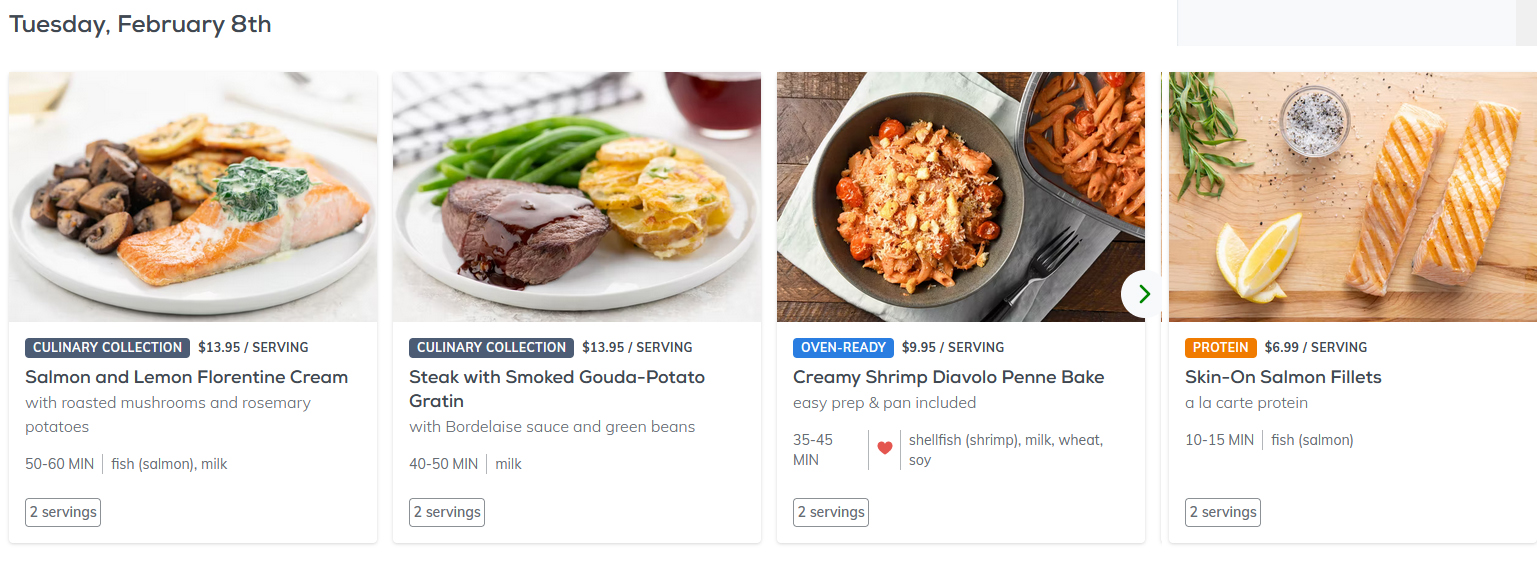
Let’s look at my February 8th order:

Source: HomeChef.com

I chose a salmon meal, a steak meal and a baked pasta and shrimp meal. Sure, you can double any meal to 4 servings… but that also gives you double the side items which we don’t typically need. Instead, I added on 2 extra servings of salmon.

I’ll cook all four pieces of salmon when I make the Salmon and Lemon Florentine Cream dish to give Jack his own fish serving that night. And then, I’ll use the second piece on the night that we have the baked pasta and shrimp meal, because he only likes shrimp if it’s in sushi. They usually include plenty of pasta, but if I need to throw in some more penne I typically have a box on hand in my pantry.

As for the steak, I’m not supposed to eat much red meat, so Jack and I will split the steak serving and I’ll probably throw another vegetable on the stove while I’m cooking.

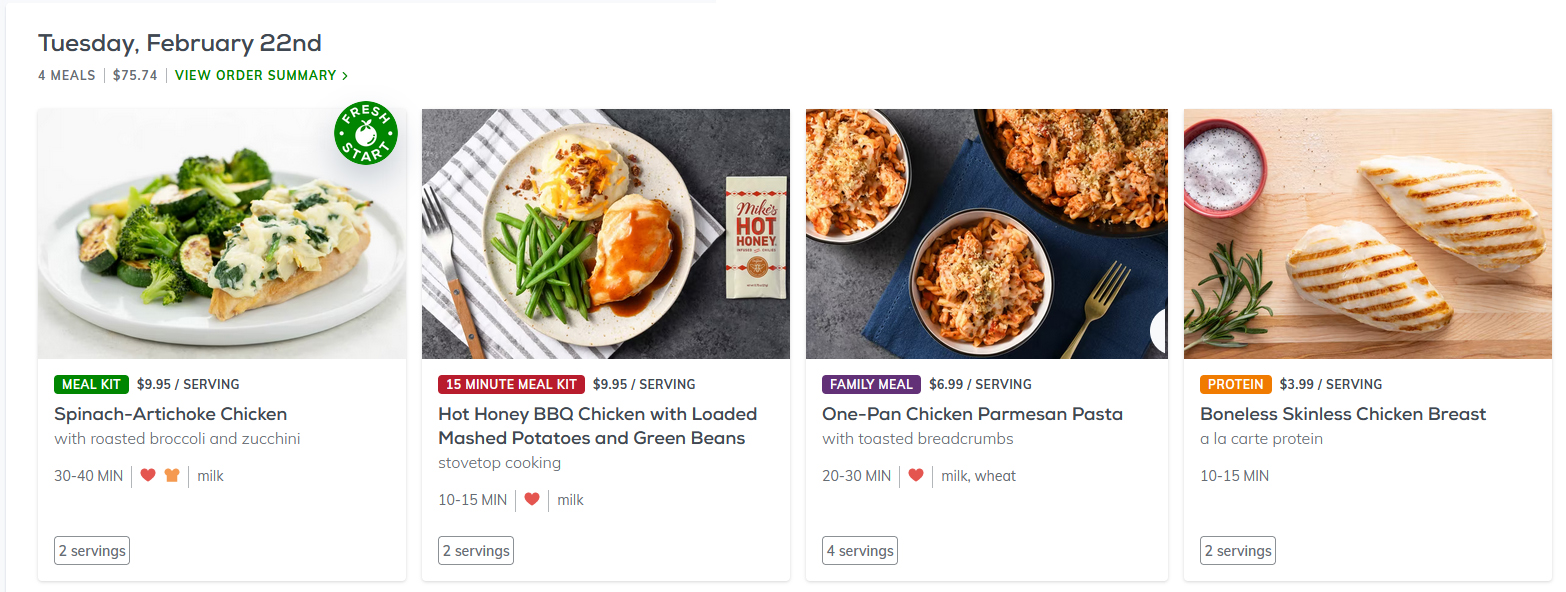
Now let’s check out my February 22nd order:

Source: HomeChef.com

For this order I have the spinach and artichoke chicken that everyone in my house LOVES, a BBQ chicken meal, a family meal of one-pan chicken parmesan pasta, and two extra servings of chicken breast.

This week, by ordering the extra chicken I can have three servings of chicken for both the 2-person meals with plenty of vegetables. The family meal will already go far, so any extras will make their way to my lunch the next day.

Other Ways I Stretch: Home Chef offers a whole “Extras” section at the bottom of each week’s choices, which includes everything from flatbread pizzas, chopped salads, or additional protein packs. This makes it super easy to throw on another option if I feel like Jack isn’t going to like the meal choice. And yes, I am quite aware that I could go to the grocery store and buy packs of chicken or salmon for a little cheaper – but it’s the convenience factor that does it for me. Frankly, something’s got to give. And if I pay a little extra and we can enjoy healthy homemade meals… I’m in!

Give $35, Get $35 Referral Code
If you would like to try Home Chef, you are welcome to use my special referral code: https://www.homechef.com/invite/julied53 Those who sign up using the referral invitation will receive a $35 discount off of their first order and I will earn $35 in Home Chef credit towards a future order.

If you do decide to try Home Chef, please let me know what you think! A little tip though, when you sign up for your first delivery go in and immediately “pause” your second delivery date. That way you can try out a box and decide whether you want to keep the subscription before having to pay for a second box. Then, if you don’t like it just hit “cancel” and you won’t get any more boxes or be charged more than your initial payment.

{Disclosure: This was not a sponsored review. I pay for my Home Chef subscription with my own money. If you choose to use my special referral promo code, I will receive a credit towards my future Home Chef orders. For anyone who does decide to use the code… my tummy thanks you!}

My Peloton: 1 Year Check-In

Way back in December 2020, I decided to jump on the Peloton bandwagon. I started with using the Peloton app with a non-Peloton bike and then in May I upgraded to an actual Peloton bike. You can find all my previous check-in posts here:

Now that it has been a full year since I joined the ‘Peloton Cult’ I figured it is the perfect time for another update. For this update, I’m revisiting each of the questions I’ve answered over the past year with my updated responses.

Do I still like the equipment I bought?

In December 2020, I started out with a non-Peloton bike. Here is exactly what I bought:

I was happy with the non-Peloton bike for the first 6 months and it is still working just fine. However, I upgraded to an actual Peloton Bike in May 2021.

Why did I upgrade? Well, after 6 months of consistently using the app and guesstimating the cadence and resistance call-outs, I found that I was no longer challenging myself. Also, after trying a friend’s Peloton, I was shocked at the cadence and resistance monitor’s ACTUAL feedback. When Peloton reached out with a Memorial Day deal, I jumped on it and I have no regrets at all. The Peloton bike is super sturdy and I’ve gotten the hang of the clip-in shoes as well. I like the leaderboard option mostly because I like to compete against my own previous records. I also enjoy the live rides and encore rides, because other people riding with me and hi-fiving is super fun!

As for the CHAOKE bike, I still currently have it set up next to my Peloton. My husband has ridden it a couple times but honestly, it’s just not love for him. So, I think I’ll be listing it on Facebook Marketplace once we start our bathroom/closet renovation project and need the space.

Who are my favorite instructors?

  • Favorite for Cycling: Bradley Rose or Cody Rigsby
  • Favorite for Strength: Adrian Williams or Emma Lovewell (core)
  • Favorite for Yoga: Kristin McGee
  • Favorite for Mediation: Anna Greenberg or Ross Rayburn
  • Favorite for Stretching: Ben Alldis or Adrian Williams

Am I keeping motivated?

You guys. I have consistently exercised for an entire year. AN ENTIRE YEAR. I am the person who has started and then stopped a bazillion exercise programs and gym memberships and I’ve actually stuck with Peloton for A YEAR!

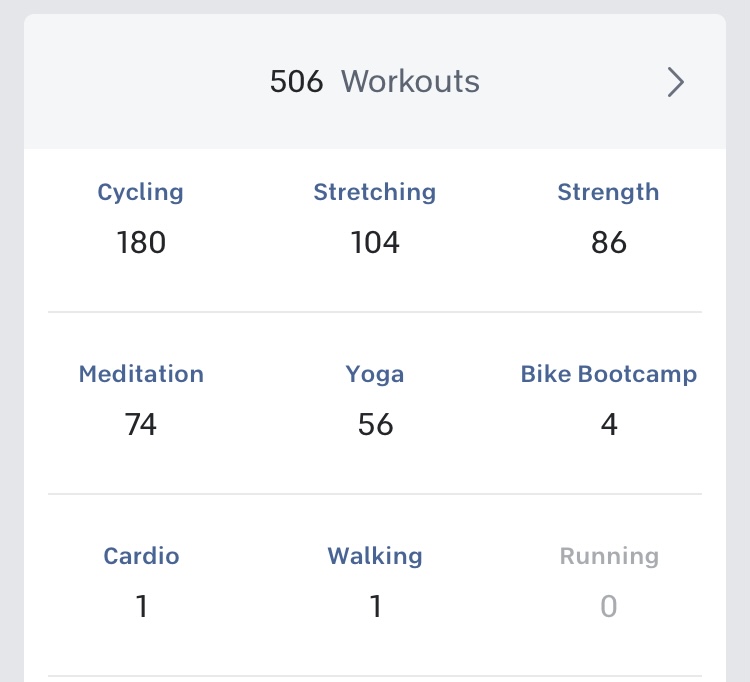
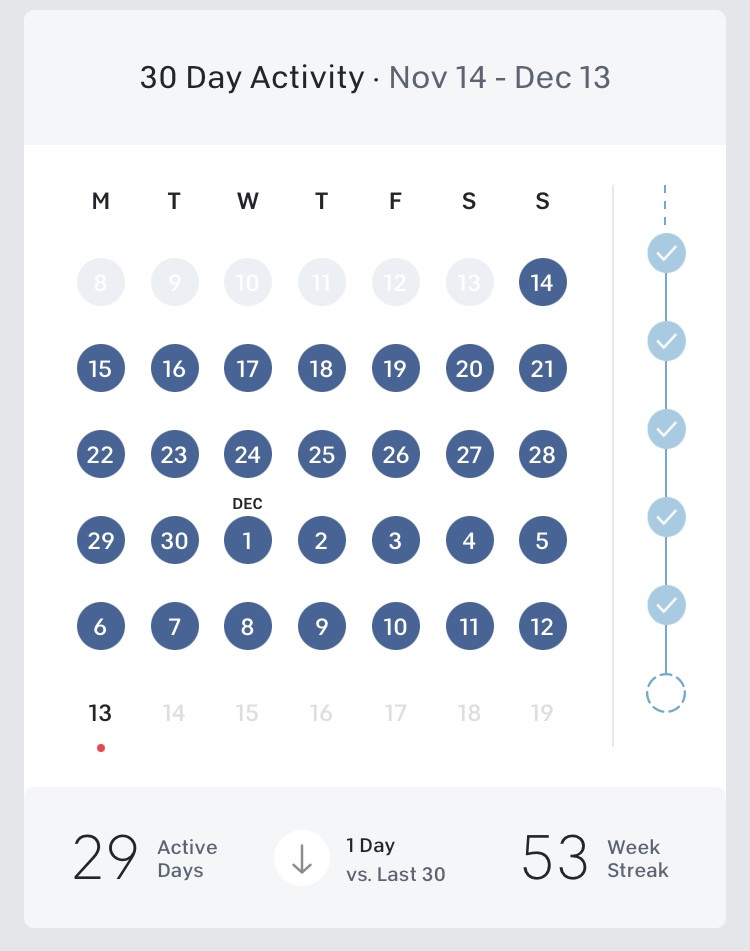
How I’ve kept motivated: I gave myself a goal to do something on the Peloton app each day. It doesn’t matter if it’s a cycling class with a strength class, or just a 5-minute meditation. Every single day, I take a little bit of time just to myself.

And it works! As of today, I have a 53-week streak and I’ve done something EVERY SINGLE DAY.

While I usually just pick a workout based on how I’m feeling that day, I also gave myself a challenge back in October to do Crush Your Core with Emma, a series of core workouts for 4 weeks. The workouts ranged from 5 – 10 minutes each day (some days were ‘off days’ or stretch days) and I did every single one and could really feel my core growing stronger. I plan to do this series again soon!

Do I still use the Peloton app, or just use the bike?

I actually use both the Peloton app and the Peloton bike (which has the app built in to the screen). I have the app on my phone and my kindle, so it’s super easy to grab it and settle down anywhere (even a hotel room) for a nice stretch. I’ve even enjoyed an uplifting mediation on a stressful drive home from work – I just make sure not to get TOO relaxed while driving!

How much weight have I lost?

As for weight, I’m not exactly sure. I’m not sure exactly how much I weighed in December 2020 but I think I’m 2-3 pounds down. As for measurements, I first measured myself at the end of January 2021.

Here are my measurement changes:

  • Bust: – 1/2 inch
  • Belly: – 1 inch
  • Butt: – 1/2 inch
  • Thighs: – 1 inch each

While I am much more active, I didn’t drastically change my diet so I wasn’t really expecting any crazy before/after change. However, I’m currently dealing with some food allergy stuff, so I may have to restrict and/or limit my diet in the near future once I figure out what I’m allergic to.

Overall Thoughts

I’m super happy that I made the choice to first buy the Peloton app and then purchase the Peloton bike. This is the first time I’ve ever stuck with a fitness goal for so long and I’m really proud of myself. I can certainly tell that my endurance has improved over the last year and I really do enjoy jumping on the bike to cycle along and sweat it out to a fun instructor. I’ve also really grown to enjoy the off-bike classes like Yoga and Meditation. Initially, I was thinking I’d end my streak at 1 year and just workout when I felt like it… but I’ve decided to keep it up with doing something every day for year two as well.

If you’re a Peloton rider, you can find me on the leaderboard at JoulesGetsFit.

If you are looking to purchase a Peloton, shoot me an email at pocketfulofjoules@gmail.com and I can send you a special referral code to get you money off your purchase!

Disclaimer: This post contains Amazon affiliate links. This means that clicking on a link may help me earn a small commission at no cost to you.